Make Available MS Outlook Email Address Autocomplete After Drive C Format
Microsoft Outlook users have noticed an autocomplete option that stores and shows all email addresses automatically whenever they type an address to send a mail. The autocomplete file automatically stores every new email address that the user types in, and it appears every time he composes a new mail.
MS Outlook automatically creates a database file called “Outlook.NK2” for its new users.
Normally, this database file is stored in a hidden system folder, which should be copied to a Windows folder option in order for it to be visible. Unless visible, this hidden file cannot gain access or view the “Outlook.NK2” file.
After formatting the C drive and reinstalling Windows, everyone noticed that email addresses in the autocomplete of MS Outlook 2003 and 2007 were missing.
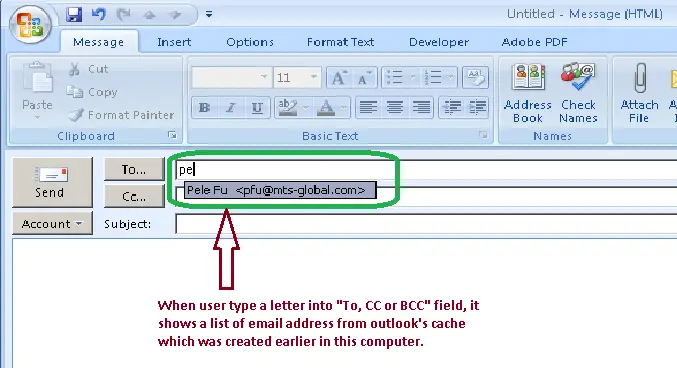
So, in order to solve this problem all we have to do is back up a small database file called Outlook.NK2 before formatting the system drive and replacing the file after Windows has been installed in the same location. Just follow the guide below to complete the procedure:
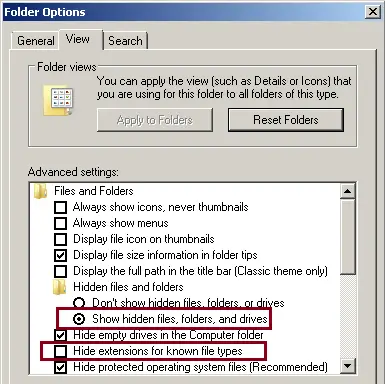
1. To make hidden files and folder visible, untick the option “Hide extensions for known file types” at My Computer ->Tools->Folder Option->view.
Then …
1. Go to C:Documents and Settings[User Profile]Application DataMicrosoftOutlook (in Windows XP, Windows 2000 and Windows 2003 OS)
Or
2. Go to C:Users[User Profile]AppDataRoamingMicrosoftOutlook (Windows Vista, Windows 7, or Windows server 2008 OS)
3. Copy the “Outlook.NK2” file into a flush drive, or any other drive, except the drive which you are going to format and install the OS (Operating System).
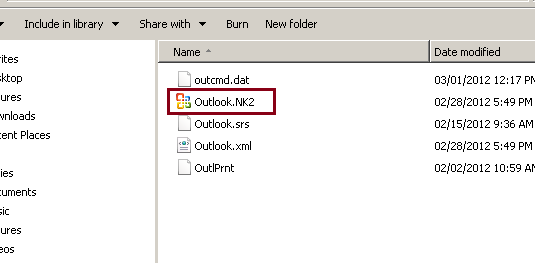
5. After completely installing the OS and Office package, just paste the Outlook.nk2 file onto the same location mentioned above. Make sure to copy the right .NK2 file. Look carefully for the file extension because there are many other files located in the same folder that may have the same name. Unless you make file extension visible from the folder option, you can’t determine the exact file type.
Sometimes a computer shows that the hidden system folder cannot be accessed; this happens due to some virus infection. To get rid of this hassle, keep your computer virus and malicious software free, regularly check for errors in registry, malware and spyware protection. There are lots of free and commercial software products available on the Internet for virus guard, registry cleaning, spyware and malware removal.